Solitaire - Classic Card Game
- 4.4
- Rating
- 10.00M
- Installs
- Free
- Price
 Analysis by App-foxy
I spent time with Solitaire - Classic Card Game as a simple way to play a familiar card game without committing to a long session. It is the kind of game I can open while waiting for an appointment, during a quiet coffee break, or when I want something mildly challenging rather than another noisy, demanding mobile experience. Its appeal is straightforward: classic solitaire rules, quick rounds, and enough decision-making to keep the mind occupied.
That simplicity is also what makes the game easy to misunderstand. If you expect a large collection of card modes, a deep progression system, or a social experience, this is probably not the right download. If you want a focused card game from Easybrain that trains patience and rewards careful choices, it makes a much stronger case. I found the experience most enjoyable when I treated it as a short mental reset instead of a game I needed to play continuously for hours.
What using the game actually feels like
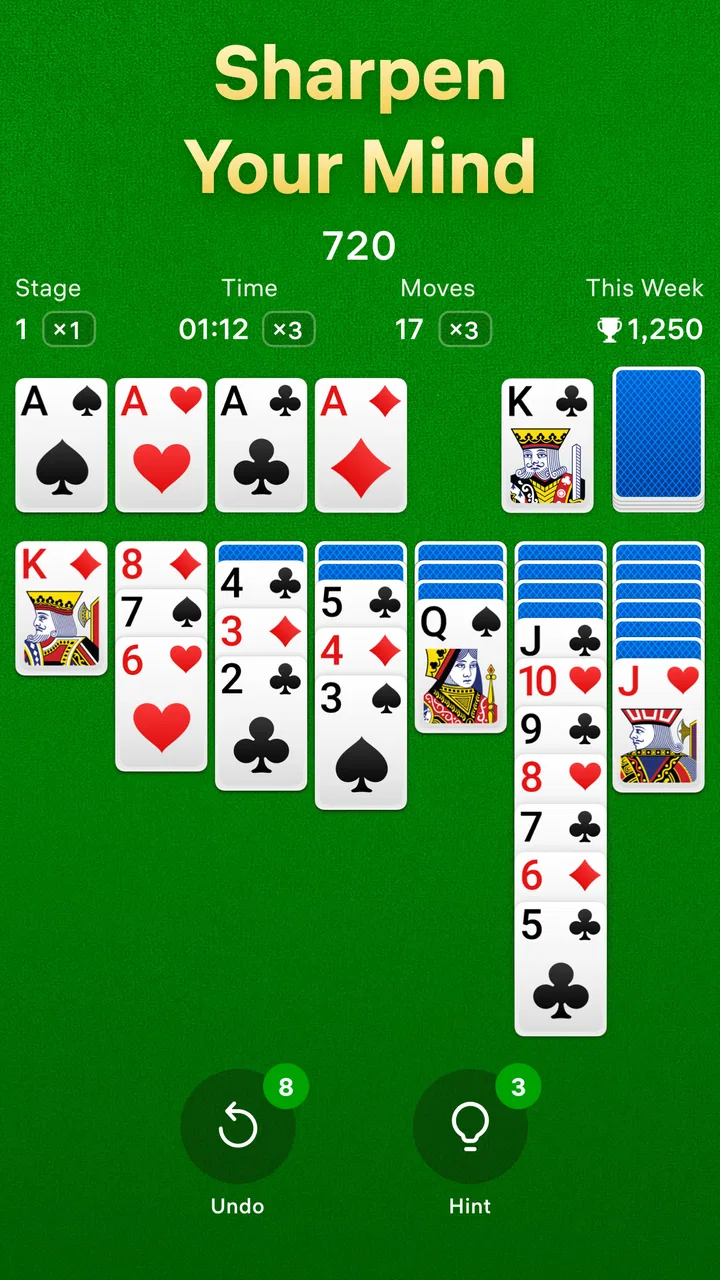
The basic appeal is the familiar solitaire layout. Cards are arranged so that each move requires a little planning: I have to decide whether to expose a hidden card, preserve an available space, or move a visible sequence before I know whether that choice will help later. The rules are easy to recognize, but a careless move can leave the rest of the deal awkward. That balance gives the game more substance than a purely automatic card-matching activity.
You May Also Like

 AccuWeather: Weather Radar
AccuWeather Review: A Quick, Clear Forecast for Everyday Decisions
For everyday plans, the best forecast is the one you can understand quickly. AccuWeather makes rain timing, radar, and local conditions easy to act on, with a few trade-offs.

 Hill Climb Racing
Why Hill Climb Racing Still Turns Crashes Into One More Run
A tiny car, a bumpy hill and one more upgrade: Hill Climb Racing keeps resurfacing because its simple chaos makes every near-miss feel personal.

 AliExpress - Shopping App
AliExpress Makes Global Shopping Feel Personal, but Shoppers Bear the Risk
AliExpress turns a global marketplace into a pocket-sized discovery engine. Its reach is useful, its shopping loop compelling, and its trade-offs easy to miss.

 Lords Mobile: Kingdom Wars
Lords Mobile Is a Kingdom-Building Routine, Not a Quick Match
A case-by-case verdict on the building, battles, device demands, and social commitments that make Lords Mobile rewarding for some players and exhausting for others.

 PDF Scanner app - TapScanner
TapScanner Makes Paperwork Easier to Capture, Check, and Share
TapScanner makes scanning with a phone feel less like a rescue operation and more like a dependable step in getting work done. Its capture tools are useful, though not flawless.

 Block Blast!
 Shows How Much a Puzzle Game Can Leave Out
A quiet grid game shows why puzzle players increasingly value instant clarity, repeatable skill and low-pressure play—and where the genre still needs to catch up.
More From Our News Desk
View All News


Because the rounds are compact, I do not need to prepare for a long session. A spare few minutes is enough to start a deal and make meaningful progress. This makes it a useful alternative to scrolling through social feeds when I want something that occupies my attention without demanding full concentration. The pace is calm, although players who prefer rapid action may find the deliberate card-by-card rhythm too slow.
The game belongs firmly in the classic card game category, and that focus is important. It does not need a complicated tutorial to explain its purpose. Someone who already knows solitaire can start quickly, while a newcomer can learn the logic by experimenting with the layout. I would still recommend playing the first few rounds patiently rather than tapping rapidly, because understanding which cards are being uncovered is more valuable than simply moving whatever is currently available.
Where people are most likely to get stuck
The first common difficulty is not installation; it is decision-making inside a deal. New players often move a visible card because the move is legal, without considering what it reveals or blocks. My most useful habit was to pause before every move that changes a long sequence. I first looked for a way to uncover a face-down card, then checked whether the move would leave a useful empty space, and only after that considered cosmetic rearrangements.
Another sticking point is assuming that every deal can be solved by playing quickly. Solitaire rewards keeping options open. If two moves are possible, the better one is often the move that exposes more information rather than the move that immediately places a card in a foundation. That is a small distinction, but it changes the game from random tapping into a repeatable process.
I also noticed how easy it is to lose track of the next useful move when the board becomes crowded. When that happens, I stop trying to solve the whole layout at once. I scan from the hidden cards outward, identify which columns can be opened, and then check the available cards again. This reset takes only a moment and is more effective than repeatedly moving the same sequence back and forth.
Players who are used to highly guided puzzle games may initially want stronger prompts or more obvious direction. Here, the satisfaction comes from noticing the opportunity yourself. That is a strength for people who enjoy thinking through a board, but a weakness for anyone looking for constant assistance.
Simple setup checks before blaming the game
On Android, the game requires at least version 8.0 of the operating system. That is a modest requirement, but it is still worth checking before troubleshooting a failed installation or an app that will not open. I would begin with the device’s system information, then make sure there is enough free storage for the installation and temporary files. These are ordinary checks, but they prevent a lot of confusion.
The game is free to install and is marked for Everyone, which makes it approachable for a wide range of players. Free does not necessarily mean every part of the experience is free from interruptions or optional spending, so I would still pay attention to any purchase screen rather than confirming it automatically. In-app purchases are listed at $14.99 per item, a price point that makes deliberate tapping especially important if a child is using the device.
If the download appears stuck, I would check whether other applications can update normally. A broader store or network problem is more likely than a solitaire-specific failure when several downloads are affected. Switching between a reliable Wi-Fi connection and mobile data can help identify whether the connection is the issue, but I would avoid repeatedly pressing the install button while the store is still processing the first request.
For an app that opens and then behaves strangely, my first safe steps are to close it, reopen it, and restart the phone. If that does not help, checking for an available update is sensible. The current version is 4.1.0, so keeping the installed copy current is a reasonable part of setup rather than an advanced fix. I would be cautious about clearing storage or reinstalling until I was comfortable with the possibility of losing local progress or settings.
Recovering a session without making the problem worse
One practical lesson with any short-session game is to avoid treating a temporary interruption as a disaster. If the screen freezes, I would wait briefly before tapping repeatedly. Rapid taps can create extra moves after the game responds, which is particularly frustrating in solitaire because one unintended move can alter the whole layout. Closing the game cleanly and reopening it is preferable to trying to force a long series of commands through a delayed screen.
If a deal seems impossible after an interruption, I would first inspect the board carefully rather than immediately restarting. A card may have moved while the screen was catching up, or a sequence may now be placed differently than expected. Reconstructing the available moves from the visible layout is slower, but it avoids throwing away a winnable position.
When I do restart a round, I use the next attempt to change one habit instead of playing in exactly the same way. For example, I may prioritize uncovering a hidden card earlier, or avoid filling an empty column until I know which king can use it. This turns a failed deal into useful feedback. It is one reason the game works well as a patience exercise: improvement comes from noticing patterns, not from collecting complicated equipment or learning a large ruleset.
There is also a practical difference between being stuck and being finished. If no useful card is exposed, I scan the draw area and each tableau column in a fixed order. That prevents me from overlooking a legal move simply because I am focusing on one side of the screen. I found this workflow more reliable than tapping every highlighted-looking card and hoping the board would solve itself.
For players who care about uninterrupted progress, I would avoid switching rapidly between several demanding apps while a round is open, especially on an older phone. That is not a special requirement of this game; it is a sensible way to reduce reloads and accidental closures in any lightweight mobile game. The main point is to make recovery predictable: pause, close normally, reopen, and reassess before taking drastic action.
When the app is not the cause
Not every problem that appears while playing comes from the game itself. A phone with very little free space may struggle with updates or general responsiveness. A weak connection can affect installation and any part of the experience that depends on loading something from the device or service around it. If the same delay appears in other apps, I would investigate the phone or network before deciding that this solitaire game is defective.
Touchscreen problems can also look like gameplay mistakes. If taps regularly register beside the intended card in other applications, the issue may be the screen, a thick protector, moisture, or a case pressing near the display edge. Solitaire is particularly revealing here because accurate placement matters. Before restarting a deal repeatedly, I would test a few ordinary buttons elsewhere on the phone.
Battery-saving modes and background restrictions can change how applications behave after being left idle. If the game reloads after I return from another task, I would first consider whether the phone is aggressively managing memory or battery usage. A reload is inconvenient, but it does not automatically mean the card layout or the installation is damaged. Restarting the device and checking its general performance gives a clearer picture.
Notifications and purchase prompts can also be mistaken for gameplay features. Since the game is free with optional in-app purchases, I recommend reading each on-screen option before confirming it, particularly when handing the phone to someone else. If you want a completely distraction-free card experience with no commercial prompts at all, a paid alternative may suit you better, even if it offers fewer conveniences elsewhere.
There is a similar distinction between the game’s design and a player’s expectations. Solitaire is intentionally repetitive. If the experience feels too familiar after several rounds, that is not necessarily a malfunction; it may simply mean the traditional format has reached its limit for you. A collection with multiple card variants would be a better choice for variety, while a competitive card game would be more suitable if you want opponents, ranking, or social pressure.
How it compares with other ways to play solitaire
Compared with playing with a physical deck, this version is obviously more convenient. I do not need a table, I cannot accidentally scatter the cards, and a short break is enough to begin. The digital format also removes the small setup and cleanup tasks that can make physical solitaire impractical outside the home. On the other hand, a physical deck has a tactile quality that a touchscreen cannot reproduce, and it avoids concerns about battery life or screen fatigue.
Compared with a broad solitaire collection, this game is easier to approach because its identity is clear. There is less need to decide which mode to learn or which menu to explore. That focus is helpful when I want one familiar activity, but it becomes a limitation when I am bored with the standard format. Players who enjoy experimenting with different rules should look for a more varied card app instead.
Compared with a competitive multiplayer card game, the mood here is much quieter. There is no need to wait for another player, match someone else’s speed, or worry about a ranking. That makes it a good choice for winding down or filling a short gap. It is not the better option for someone who needs conversation, rivalry, or a changing human opponent to stay interested.
The game’s broad audience is reflected in its Everyone age rating, and its popularity is substantial: it has passed ten million installs, with a 4.4 average from around one hundred sixty-four thousand ratings. Those figures do not replace personal taste, but they do fit my impression that this is a mainstream, approachable version of a familiar game rather than a niche experiment. Easybrain has kept the central idea recognizable, which is exactly what many solitaire players want.
Who will get the most from it
I would recommend it to someone who wants a low-pressure game for waiting rooms, commutes, lunch breaks, or the few minutes before bed. It works especially well for people who enjoy quiet concentration and do not need a story, characters, or a large progression system. The mental effort is small enough for casual use, but the choices are meaningful enough to stop the session from feeling completely automatic.
A realistic everyday example is a delayed appointment. Instead of opening several social apps and losing track of time, I can play one deal, put the phone away, and return to what I was doing. The round has a natural stopping point, so it does not demand the same commitment as a long strategy game. That makes it useful for controlled breaks rather than endless entertainment.
I would be more selective about recommending it to children who use a shared phone. The age rating is Everyone, but optional purchases still deserve adult supervision. I would also skip it for anyone who dislikes repeated layouts, touch controls, or games where a poor early choice can make the rest of a round feel unrewarding. A more guided puzzle game would be kinder to players who want constant confirmation that they are on the right path.
People with limited storage or older devices should complete the basic system and space checks before installing. The minimum operating-system requirement is Android 8.0, and the game is free, but a phone’s overall condition matters more than the label on the store page. If other apps already struggle, this may not be the best place to spend troubleshooting time.
My practical verdict
After using it as a short-session game, I see Solitaire - Classic Card Game as a dependable choice for a very specific need: familiar card play with minimal learning and no requirement to interact with anyone else. Its strongest quality is restraint. It gives the traditional format room to work instead of burying it under systems that would distract from the cards.
The trade-off is equally clear. This is not where I would look for a large selection of modes, deep customization, or competitive excitement. Optional purchases also mean I would pay attention to every confirmation screen, especially on a family device. And when a session goes wrong, the best response is usually a calm board review and basic device troubleshooting, not repeated tapping or an immediate reinstall.
For me, the game earns a recommendation because it fits naturally into ordinary gaps in the day. I can play for a few minutes, think through a compact problem, and leave without feeling that I have started a major commitment. If that sounds like the kind of card experience you want, the free download is easy to justify. If you need variety, multiplayer competition, or a completely interruption-free experience, I would choose a different card app instead.
My bottom line: install it for focused, familiar solitaire and patient decision-making, but approach it with realistic expectations. It is best as a clean mental break, not as an endlessly expanding game. Once you understand that role, its simplicity feels less like a missing feature and more like the reason it remains useful.
FAQs for Solitaire - Classic Card Game
01What features does Solitaire - Classic Card Game offer?
Solitaire - Classic Card Game provides a traditional card game experience with features like customizable card decks, daily challenges, and multiple scoring modes. It also includes hints and undo options to enhance gameplay. The app supports both portrait and landscape orientations, making it adaptable for different play styles.
02Is Solitaire - Classic Card Game free to download and play?
Yes, Solitaire - Classic Card Game is free to download and play. However, it may include optional in-app purchases and ads. The purchases often allow users to remove ads or unlock special themes and features, enhancing the overall gaming experience without interruptions.
03Can I play Solitaire - Classic Card Game offline?
Yes, Solitaire - Classic Card Game can be played offline. This feature makes it a perfect companion for situations where internet connectivity is limited, such as during travel or in remote areas. You can enjoy the full classic card game experience without needing an active internet connection.
04How does Solitaire - Classic Card Game ensure user privacy and data security?
Solitaire - Classic Card Game prioritizes user privacy by adhering to strict data protection policies. The app collects minimal user data, primarily for improving the gaming experience. Users are encouraged to review the privacy policy available within the app to understand how their data is managed.
05Are there any accessibility features in Solitaire - Classic Card Game?
Yes, the game includes several accessibility features to accommodate different user needs. Options such as adjustable card sizes, high contrast modes, and voice instructions are available to ensure that players with visual impairments or other disabilities can enjoy the game comfortably.
Pros
- Smooth and intuitive controls.
- Customizable card backs and themes.
- Offline play available.
- Daily challenges and rewards.
- Minimal ads for free users.
Cons
- Limited multiplayer options.
- Occasional app crashes reported.
- No landscape mode support.
- In-app purchases can be pricey.
- Lacks tutorial for beginners.

Solitaire - Classic Card Game
Gallery